Steam Controller Review
Audio Summary
AI Summary
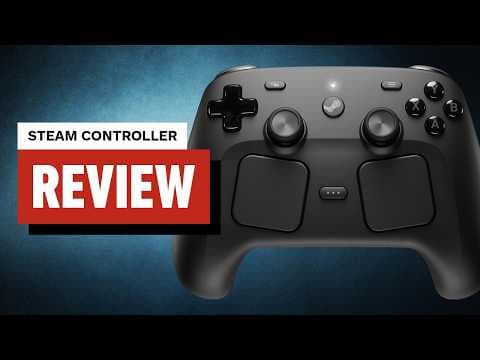
More than 10 years after the original Steam Controller, Valve has released a new version designed for PC gaming. While the original controller had a small following and its haptic touchpads were polarizing, its innovations influenced the Steam Deck. The new Steam Controller, which has quickly become a favorite for PC gaming after two weeks of testing, shares a similar look with the Steam Deck and diverges from the standard Xbox controller.
It features a symmetrical dual thumb stick layout, akin to the PS5 controller, with AVXY face buttons and a D-pad that also mostly mimic the PS5 layout. The face buttons are solid, offering a satisfying press without instability or warp, though they are not particularly clicky. The D-pad has good travel and isn't mushy, but it lacks the clickiness of the Xbox Core controller and definition on the inner cardinals, making it less ideal for fighting game inputs. For such games, a dedicated fight stick is recommended.
On top, the bumpers feel similar to the face buttons, while the triggers have a comfortable lip and travel distance. Although there are no physical trigger stops, Steam Input allows for customization of activation points or assignment of separate actions for soft versus full pulls. Rear buttons are positioned under the middle and ring fingers and are generally comfortable to press, though the bottom two (R5 and L5) can be accidentally pressed in certain resting positions.
The analog sticks are excellent, with a shallow concave top and rubberized lip. They are comfortable and snap back to the center quickly. Unlike most controllers, these sticks have capacitive touch capability, detecting thumb contact to toggle advanced features like gyroscopic controls. Beneath the sticks are tunneling magnetoresistance (TMR) sensors, which use magnets for a higher polling rate, lower power consumption, and greater precision than traditional analog or Hall effect sticks. TMR sensors are also virtually immune to stick drift, ensuring long-term durability.
Below the thumb sticks are the controller's most unique feature: a pair of large, square touchpads, similar to those on the Steam Deck. These capacitive pads offer pleasant haptic feedback upon touch and can be used as buttons. By default, the entire pad acts as a single input, but Steam Input allows for customization to mimic directional buttons, a radio wheel, or complex control schemes, either customized by the user or downloaded from community profiles.
While the touchpads are a "nice to have," particularly for games without controller support or for navigating the Windows desktop outside of Big Picture Mode, they are not always the most efficient or enjoyable for complex game interactions. Testing with games like Crusader Kings 3 and Against the Storm, which lack built-in controller support, showed that while playable, the experience was often frustrating. However, for a couch and TV setup, the touchpads are critical for desktop navigation.
The front of the controller also includes four start/select-like buttons: View (left), Menu (right), Quick Access Menu (between trackpads), and the large Steam button (center). The Steam button has cascading functions, turning the controller on, launching/focusing Steam, entering Big Picture Mode, and finally opening/closing the Steam menu. This sequence streamlines the process of getting from the Windows desktop into a game, mimicking the ease of console gaming.
Connectivity is managed by a small puck attached to a 5-foot USB cable, which connects magnetically to the controller. The puck has rubber grips to keep it anchored, and the magnetic connection makes charging easy. The puck's USB-C port allows for cable swapping. Valve claims a 35-hour battery life, though the ease of charging meant the battery rarely ran low during testing. A USB-C port on top of the controller allows for charging without the puck, and multiple controllers can connect to a single puck. Bluetooth is supported but is cumbersome for frequent device swapping. The Steam Controller is not compatible with consoles.
Priced at $99, the Steam Controller offers excellent value for its features, checking most boxes for a "Pro Controller," including customizable controls, back buttons, advanced stick/button sensors, and unique touchpads, all while costing significantly less than high-end controllers like the Xbox Elite or DualSense Edge. While it lacks short-throw trigger stops and swappable parts, and its face buttons are merely "perfectly fine," it boasts top-notch thumb sticks, outstanding haptics, and exclusive touchpads. It provides both an excellent out-of-the-box experience for PC gaming and desktop navigation, and a robust platform for enthusiasts to customize controls and touchpad settings, without sacrificing one experience for the other.