Sous-agents Claude Code : le guide complet
AI Summary
This summary explores the advanced world of "sub-agents" within the Claude Code ecosystem, as detailed by Boris Cherny, the creator of Claude Code. Cherny’s personal workflow involves running 10 to 15 parallel Claude sessions—spanning his terminal, web browser, and mobile devices—leveraging sub-agents as his "secret weapon" to multiply productivity.
### Understanding Sub-Agents
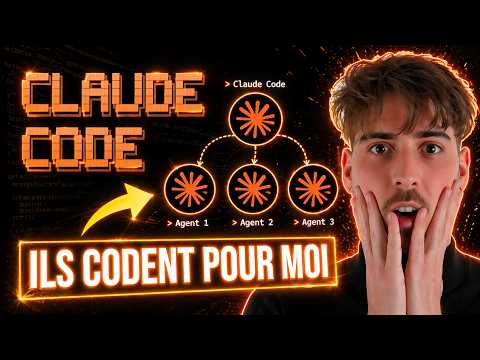
A sub-agent is a specialized assistant that the primary Claude instance can invoke to handle specific, isolated tasks. Unlike standard interactions, each sub-agent operates within its own distinct context. This prevents the main conversation from becoming cluttered with excessive data, such as large codebases or logs. Sub-agents are defined by their own system prompts, customized toolsets, and specific models. For instance, a user might assign the faster "Haiku" model for quick searches and the more powerful "Opus" model for complex reasoning.
Crucially, sub-agents are designed with a safety constraint: they cannot create other sub-agents. This intentional limitation prevents infinite loops and uncontrolled resource consumption.
### Key Advantages: Context, Parallelism, and Specialization
The primary goal of using sub-agents is context preservation. When Claude explores a codebase, it may read dozens of files, which quickly fills the context window. By delegating this to an "Explore" sub-agent, the research happens in a separate environment, and the main agent receives only a concise summary.
Parallelism is the second major benefit. Claude can launch multiple sub-agents simultaneously. While one agent analyzes security vulnerabilities, another can conduct a code review, and a third can generate documentation. This multi-threaded approach is how Cherny manages over a dozen sessions at once.
Finally, sub-agents allow for strict specialization. You can restrict an agent’s capabilities to "read-only" for analysis tasks, ensuring it never accidentally modifies files. Conversely, a debugging sub-agent can be granted write permissions to fix identified issues.
### Sub-Agents vs. Skills and Slash Commands
The transcript clarifies the distinction between different Claude features. "Skills" and "Slash Commands" operate within the main conversation's context and lack autonomy or parallelism. Sub-agents, however, are autonomous and run in separate contexts. While skills are best for reusable conventions and workflows, and slash commands for one-off actions (like a commit), sub-agents are the preferred choice for tasks involving high output, deep exploration, or parallel analysis.
### Built-in Sub-Agents
Claude Code comes equipped with three native sub-agents that it uses automatically:
1. **Explore:** Optimized for fast, read-only codebase research. It typically uses the Haiku model and employs tools like `grep`, `glob`, and basic `bash` commands. It offers three depth levels: Quick, Medium, and Very Thorough.
2. **Plan:** Triggered in "Plan Mode" (Shift+Tab), this Sonnet-powered agent researches the codebase to design a structured execution plan before any code is modified.
3. **General Purpose:** A Sonnet-based agent used for complex, multi-step tasks requiring both reading and writing capabilities.
### Creating and Customizing Sub-Agents
Users can create custom sub-agents using the `agents` command. These can be project-specific or personal (available across the entire machine). The transcript recommends using Claude itself to generate these agents by providing an explicit description. For example, a "Code Review Specialist" can be programmed to proactively analyze code quality and security after every modification.
Custom agents are configured via a Markdown file consisting of two parts: a YAML frontmatter (defining the name, tools, model, and memory) and a system prompt. The transcript highlights the "proactive" keyword in the description, which tells Claude to invoke the agent automatically without a manual prompt.
### Advanced Plugins: Code Simplifier and Ralph Loop
The ecosystem includes powerful plugins. The "Code Simplifier," open-sourced by Anthropic in early 2026, is Cherny’s favorite tool for cleaning up architecture after completing a feature.
Another notable mention is the "Ralph Loop" plugin, which gained popularity in 2026. Inspired by the persistent character Ralph Wiggum, this plugin uses a "stop hook" to intercept Claude’s exit attempts. It reinjects the prompt continuously until the task is fully completed or a maximum iteration limit is reached. While token-heavy, this "autonomous loop" has allowed developers to build entire compilers or migrate complex React codebases in single, unattended sessions.
### Boris Cherny’s Expert Workflow
Cherny uses the Opus 4.6 model exclusively, arguing that its superior tool handling and accuracy make it faster in practice than smaller models, despite higher costs. His workflow follows a specific sequence:
1. Start in **Plan Mode** to establish a solid strategy.
2. Use **Auto-accept** for one-shot implementation.
3. Run **Code Simplifier** to clean the code.
4. Invoke **Verify App**, a sub-agent that uses a Chrome extension to test the application end-to-end.
5. Execute a final **Commit/Push** command.
Cherny emphasizes that the best results come from giving Claude the tools to verify its own work, which can triple the quality of the final output.
### Future-Proofing: Worktrees and Chaining
Recent updates (February 2026) have introduced "Git Worktrees" for sub-agents. This allows each agent to work on an isolated copy of the repository on a separate branch, preventing file conflicts during parallel execution. Additionally, users can now "chain" sub-agents, creating pipelines where one agent finds performance issues and the next optimizes them. Each sub-agent execution is assigned a unique ID, allowing users to resume or reference specific agent sessions later in the conversation.