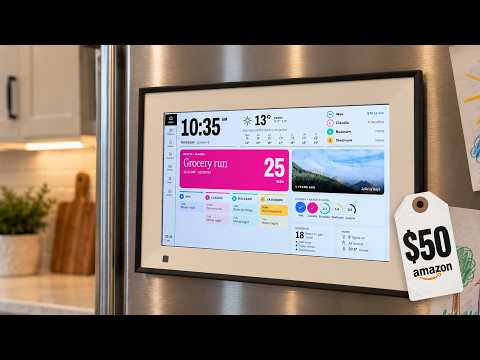
I hacked this $50 picture frame into a $500 home display
Audio Summary
AI Summary
This video details how to repurpose "e-waste" digital picture frames into functional, customized smart displays, avoiding subscription fees and overcoming hardware limitations.
Key points:
* **Fixing a Skylight Calendar:** The presenter received a $500 Skylight calendar with non-functional Wi-Fi, deemed e-waste by the company. They fixed it for $11.
* **Accessing Debug Mode:** Holding down a button while plugging the device into power forced it into debug/recovery mode, making it appear as a USB device on a computer.
* **Android Device Recognition:** The device was identified as an Android 14 device, allowing interaction via ADB (Android Debug Bridge) mode.
* **Rooting and Customization:** A coding agent helped discover a hidden passcode and enabled development mode. The device was rooted, allowing access to native Android features and the installation of a custom launcher.
* **Hardware Failure Confirmation:** Scripts confirmed a hardware failure of the Wi-Fi chip.
* **Enabling Wired Internet:** The micro USB port was forced into host mode using an OTG adapter, allowing an Ethernet dongle to provide internet access.
* **Adding External Wi-Fi:** An external TP-Link Wi-Fi dongle was added, with the agent installing necessary drivers. Scripts were created to force USB host mode on boot, enabling wireless internet.
* **Reclaiming Hardware:** The presenter advocates for users to control their own hardware, especially for devices with poor software, planned obsolescence, or subscription models.
* **Second Project - Amazon Picture Frame:** A random $50 Amazon picture frame was purchased for a from-scratch build. This frame also contained a Rockchip, common in low-end Android devices.
* **Forcing Recovery Mode (Second Device):** For this device, pressing a reset button with a pin for 15 seconds while off forced it into Android recovery mode.
* **Single USBC Connection:** This second device offered the convenience of power and data over a single USBC connection.
* **Rooting and Software Optimization:** The device was rooted, pre-installed services and software were removed, and the latest compatible Chrome/Web View (version 106) was installed for modern web display.
* **Performance Enhancements:** RAM allocation was adjusted, and swap RAM was increased for smoother browser performance.
* **Motion Sensor Integration:** The motion sensor was configured to dim or darken the display when no one is present, saving power.
* **Custom Dashboard Use Case:** The presenter plans to use the display for a family calendar, chore tracking, reminders, and photos, powered by an "agentic backend" that processes emails and school information.
* **DIY Instructions:** The presenter will share the software on GitHub and provide an instructions document for users to replicate the process with a coding agent.