Rekordbox Mobile - Is It Any Good?
Audio Summary
AI Summary
DJing on phones and tablets is gaining popularity, and after reviewing Algorithm DJ Pro, which impressed with its power, this video explores its competitor, Rekordbox DJ for mobile. The presenter, Karl Thomas, a professional DJ with over 20 years of experience, notes that while he has extensive coverage of the desktop version of Rekordbox, the mobile app hasn't been detailed on his channel before.
Regarding pricing, Rekordbox’s desktop and mobile versions are priced separately, unlike Algorithm DJ where a single subscription covers all devices. New users can access some Rekordbox mobile features for free by connecting a DJ controller, allowing them to trial the software before committing to a purchase. If they decide to buy, there are three subscription options: weekly (£2.99 in the UK), monthly (£6.99), or yearly (£49.99), with longer subscriptions offering savings. It operates on a subscription model, not a one-time payment for unlimited access. The presenter states this video is not sponsored. He finds Rekordbox mobile's pricing comparable to Algorithm DJ Pro, though Algorithm DJ Pro sometimes offers annual plans for as low as £25 in the UK.
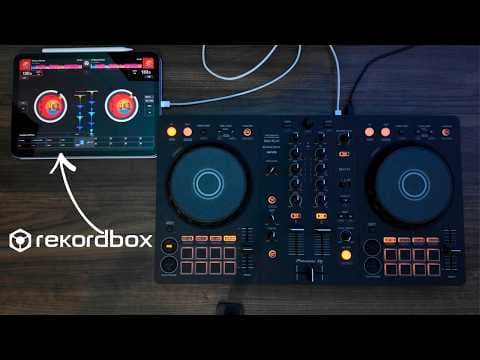
The video then demonstrates Rekordbox mobile using an iPad and a Flex 4 controller. The app’s main menu allows for wired or wireless (Bluetooth) connection to DJ controllers. Wireless connection is generally easy, though it disables the cue function and master output on the controller, requiring external speakers to be connected directly to the tablet or mobile device. The app works well even with a basic iPad, meaning a powerful mobile device isn't necessary. The iPad can also power the Flex 4 or Flex 2 controller without an external power source, though the presenter connects external power to prevent the device from dying.
The main menu also includes a DJ tutorial and access to recordings. It's important to note that, similar to the desktop software, recording DJ mixes is only possible with personal music files, not with music from streaming platforms like Spotify, due to copyright.
Comparatively, the Rekordbox app is simpler and more minimalistic than Algorithm DJ Pro, which resembles desktop DJ software even on a tablet. With an AlphaTheta controller, features are pre-mapped and work seamlessly. Tracks can be loaded from sources like Spotify, SoundCloud, Beatport, or personal music files and Rekordbox collections. The demonstration shows tracks being loaded and played, with seamless operation and fantastic latency even when connected wirelessly via Bluetooth.
All functions on the Flex 4 AlphaTheta controller are mapped effectively. Beat effects are located on the right side of the interface, and color effects on the left, but both can be applied to either deck using the channel selector. The beat effects menu offers pro-level effects found on DJM-style mixers, with some locked in the free version. Users can select effects, adjust beat parameters, assign them to channels, and activate them just like on a DJM mixer. Performance pads, loop buttons, and sync functions also work seamlessly, mirroring the desktop version. Hot cues, performance pads, pad effects, beat jump, and the sampler can all be cycled through. These elements are customizable, allowing users to edit effects and parameters for beat jump and beat loops. Holding down the shift button accesses secondary modes, consistent with the desktop version.
The sampler mode includes default samples, with adjustable volume. These samples can also be edited. Sound color effects, similar to DJM mixers, are accessible. On the FLX4, users get Smart CFX (filter, echo, space down, space up) and standard CFX (filter, jet, crush, noise, pitch, sweep). This familiarity helps users transition to laptop or CDJ setups.
A key difference from Algorithm DJ is Rekordbox’s limited customizability and the absence of stems, a feature present in Algorithm DJ mobile. The Rekordbox icon provides access to settings, allowing users to switch between jog and waveform views.
Settings can be accessed via a cog wheel icon, offering audio settings for outputting sound from the iPad speaker or an external system. Using the iPad speaker disables headphone controls. Other general settings include waveform colors (blue, RGB, three-band), phrases on waveforms, track analysis mode, auto cue and gain adjustments, and quantize beat values. The FLX4 menu provides simplistic settings, including smart fader options, but overall customization is limited. Recording settings are also available, reiterating that recording streaming tracks is not possible. Streaming services can be toggled on or off in the settings if they don't appear in the main menu, and audio quality options are available. The app requires users to log into streaming platforms upon first use.
In summary, Rekordbox mobile is a functional app for DJing at parties and events or for beginners. While it is simpler and less customizable than Algorithm DJ, and lacks features like stems, it effectively replicates many core functions of the desktop version on a mobile device, particularly when paired with AlphaTheta controllers.