Microsoft Sentinel Tutorial: Introduction, Capabilities, and Architecture | Sentinel Architecture
AI Summary
Microsoft Sentinel is a security solution that combines Security Information and Event Management (SIEM) and Security Orchestration, Automation, and Response (SOAR) capabilities. It aims to provide comprehensive visibility and enhanced security for organizations by detecting, investigating, and responding to threats in real-time.
SIEM focuses on log collection, storage, and analysis, helping organizations track and manage historical data for forensics, compliance, or auditing purposes. It also includes Security Event Management (SEM), which deals with real-time monitoring and correlation of events to detect suspicious activities or potential threats across an organization's IT infrastructure.
SOAR improves the efficiency and effectiveness of security operations by combining automation, incident management, and response orchestration. It integrates multiple security tools and systems, automates repetitive tasks like alert triggering and log analysis, and provides tools for managing and responding to security incidents effectively, often using playbooks and workflows.
What sets Microsoft Sentinel apart from other SIEM and SOAR solutions is its "pay-as-you-go" pricing model, meaning organizations only pay for the data they ingest and store. This offers a cost-effective and flexible approach, avoiding expensive upfront costs or licensing fees common with other solutions.
Microsoft Sentinel is also a fully cloud-native solution delivered as Software as a Service (SaaS). This means Microsoft handles infrastructure maintenance, hardware deployment, and updates, freeing organizations from these concerns. In a SaaS model, customers are primarily responsible only for their data and identities/accounts, unlike on-premises or Infrastructure as a Service (IaaS) solutions where more management overhead falls on the customer. This allows security teams to focus on threat detection and response rather than infrastructure maintenance.
Microsoft Sentinel can be accessed through the Microsoft Azure portal (portal.azure.com) or the Microsoft Defender portal (security.microsoft.com), which consolidates various security capabilities.
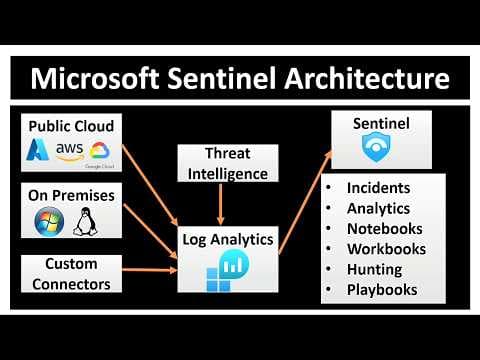
The architecture of Microsoft Sentinel involves integrating with a wide range of data sources. It supports direct integration with major public cloud platforms like Azure, AWS, and Google Cloud, collecting security logs, events, and telemetry. It also facilitates data ingestion from on-premises servers and devices (Windows, Linux, MacBooks) using agents or custom integrations. Furthermore, it allows integrations from custom or third-party data sources using APIs, custom scripts, Logic Apps, or Azure Functions. Examples of data sources include Azure Active Directory (now Microsoft Entra ID), Azure Monitor, Microsoft Defender, and other security tools like ServiceNow. Sentinel itself provides many built-in connectors for seamless integration.
All ingested data is sent to a Log Analytics workspace, which serves as the central repository for logs, metrics, and other security-related data. This workspace supports both structured (e.g., table) and unstructured (e.g., JSON) data. Sentinel uses Kusto Query Language (KQL) to analyze and query this data for insights.
Sentinel also incorporates threat intelligence sources. While it uses Microsoft's threat intelligence, organizations can integrate their own. Threat intelligence enriches collected data by identifying known malicious IPs, domains, or hashes, and correlates data with known threat patterns for faster attack detection.
Core functionalities provided by Sentinel for monitoring and incident response include:
* **Incidents:** Correlation of alerts into actionable incidents for investigation.
* **Analytics:** Built-in and customizable rules to detect anomalies and suspicious activities.
* **Notebooks:** Interactive Jupyter-based notebooks for advanced threat hunting and analysis.
* **Workbooks:** Pre-built and customizable dashboards for visualizing and reporting on security metrics.
* **Hunting:** Proactive threat hunting using machine learning and KQL queries.
* **Playbooks:** Automated response workflows built using Azure Logic Apps to mitigate threats.
In summary, Microsoft Sentinel is a comprehensive, cloud-native SIEM and SOAR solution with a flexible pricing model, designed to streamline security operations and empower organizations to detect, investigate, and respond to threats efficiently.