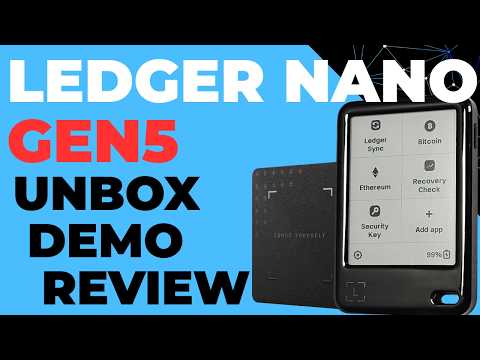
Ledger Nano Gen5 Cryptocurrency Hardware Wallet (Unboxing, Setup, Demo and Review)
AI Summary
This video provides an unboxing, setup, and review of the new Ledger Nano Gen 5, presented as a more affordable, "cut down" version of the Ledger Nanoflex. The device was provided by Ledger, but the review remains independent.
Upon unboxing, the Nano Gen 5 includes an NFC Ledger recovery key for secure digital backup, three standard recovery sheets for a 24-word seed, paperwork, a USB-C cable, and the device itself. The device features a power button on the side and a USB-C port at the bottom, with a responsive touchscreen.
The setup process, demonstrated on Windows using the new Ledger Wallet app (formerly Ledger Live), begins by downloading the application from Ledger.com/start. After installation and accepting data collection, the user selects the Nano Gen 5 from a list of devices and connects it via USB. The device undergoes a genuine check and a firmware update. The user then names the device (e.g., "Gen 5 demo") and sets a PIN, which can be different from the recovery key PIN.
Setting up the device as new involves generating a 24-word recovery phrase. Crucial warnings are displayed: never photograph or enter the phrase on a computer or mobile device. The user must carefully write down the phrase (uppercase is suggested for clarity) on the provided recovery sheets and then confirm it on the device. The speaker emphasizes that the recovery phrase *is* the wallet, with the hardware device merely providing a secure interface.
A significant feature is the included NFC recovery key. This allows for creating a PIN-protected digital backup of the secret recovery phrase. The process involves scanning the key, verifying its ID against the printed number, setting a unique PIN for the key, and then backing up the phrase. The recovery key can also be named. This digital backup is highlighted as a major value proposition for the Nano Gen 5.
Optional Ledger Sync can be enabled to keep an encrypted copy of wallet data on Ledger's servers, synchronizing account names across multiple devices. The onboarding workflow then guides the user through adding a Bitcoin account, automating the "add account" and "receive" steps. Users verify the receive address on the device's large, clear display, with an option to scan a QR code directly from the hardware wallet. A test transaction demonstrates funds appearing as pending and then confirmed in the Ledger Wallet app.
Sending funds involves unlocking the device, opening the relevant app (e.g., Bitcoin), reviewing transaction details (amount, address) on the device's screen, and holding to sign.
Beyond basic functionality, the Ledger Nano Gen 5 supports advanced use cases and third-party wallets. It seamlessly integrates with applications like Sparrow, allowing for importing key stores and viewing transactions. The device supports not only single-signature wallets but also advanced multi-signature configurations, including decaying multisig with tools like Lyanna, utilizing miniscript. Users can add additional accounts or coins, with the Ledger Wallet app automatically installing necessary applications on the device (e.g., Ethereum). Accounts can be renamed for better organization. While buy and sell functions are available within Ledger Wallet, transaction fees are noted to be generally higher than on exchanges.
The device's settings allow for customization such as changing currency, color schemes, and per-crypto settings (e.g., number of confirmations for Bitcoin). The "My Ledger" section enables installing other useful apps like "Recovery Check" (to securely verify the recovery phrase on the device) and the "2FA security key" app. Users can also install additional languages and customize the lock screen picture, which the device adapts to its monochrome display.
On-device settings include changing the device name, viewing hardware and software versions, adjusting autolock timeout, managing recovery keys, and toggling Bluetooth and NFC. A critical advanced feature is the BIP 39 passphrase, which can be entered temporarily or attached to a separate PIN. A stark warning is given: the passphrase becomes as vital as the 24-word recovery phrase, and forgetting it will lead to irreversible loss of funds.
For complex interactions like cryptocurrency swaps, the Nano Gen 5 offers "clear signing." When swapping Ethereum